
Reconciling Your Accounts
Introduction
Maintain your organization's accounting records with reports from StarChapter, your payment gateway, and your merchant account. |
Tip: Consult with a qualified accountant and use an experienced bookkeeper. Maintaining books and accounts in an accurate and timely manner protects the health of your organization and allows your board to have a real understanding of the organization's financial situation. |
Journal Entries For Your Accounting Software
Order and payment activity reports are available in StarChapter's Orders and Transactions section. These are useful for updating a full service accounting application.Keep your books current and accurate for accounting and tax purposes with StarChapter's Orders and Transactions functionality. In StarChapter, purchaser, order, receivable, and payment information are managed in detail and are easily reported. Follow these instructions to create summary journal entries in your accounting application. These journal entries are typically performed monthly.Creating a Journal Entry for your Revenue
Revenue is what was sold for a given period not necessarily what was collected.- Go to General > Orders and Transactions > Orders & Invoices. Set the Order Date filter to your period of interest. Click Filter. Review the resulting order list. Click Spreadsheet, choose the Order Details option, and click Export.
- In the downloaded spreadsheet, you can sum the Order Total column. Use that sum to create your journal entry by debiting Account Receivables and crediting your Revenue Account(s).
For Example: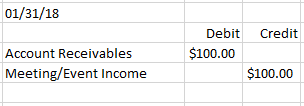
Creating a Journal Entry for your Payments
Payments are what was collected and deposited.
- In Orders and Transactions > Payments & Adjustments, set the Payment Date filter to your period of interest. Click Refresh. Review the resulting order list. Click Spreadsheet and then click Export to download the file.
- In the spreadsheet you can sum the Payment Amount column. Use that sum to create your journal entry by debiting your Undeposited Funds and crediting Account Receivables.
For Example: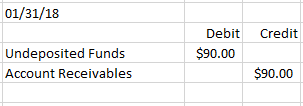
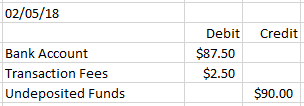
This example does not take job costing into consideration. For more advanced bookkeeping, transactions can be broken out by meeting/event by further filtering the spreadsheet by meeting/event and breaking out the journal entry to associate the revenue accordingly.
Reconciling Ecommerce Transactions
Payment transactions in StarChapter's Order Manager should be reconciled with your merchant account and bank account. Reconciling confirms you have collected the funds you expected to receive by uncovering issues like over charges for transaction fees, missing payments, delayed payments, chargebacks, etc. The process also helps confirm your accounting application contains accurate records of your organization’s financial statements and for tax purposes.
Review your credit card merchant statement. This report details any approvals, captures, declines, refunds, voids, chargebacks, and transaction fees for a given settlement period (described below). StarChapter Pay reports can be obtained through your StarChapter Admin Area. Reports from all other payment providers must be obtained through their payment gateway and/or merchant account portals.
Understanding a Traditional Credit Card Workflow
- Detailed payment transactions are securely passed via the internet from StarChapter to your payment gateway and then on to your merchant account.
- StarChapter provides functionality to report on payment transactions. The payment report is the basis for performing the reconciliation function since these payments are what you are expecting to be deposited into your bank account, with the exception of transaction fees (also called discount fees). These transaction fees are accessed by your payment gateway, merchant account, and credit card services, such as Visa, MasterCard, Discover, and American Express. StarChapter does not assess transaction fees.
- Your merchant account, on a daily basis, submits batches for settlement to the credit card services for settlement. The credit card service’s system transmits a confirmation of the transactions and will transmit data back to your merchant account.
- Your merchant account makes funds available for the deposit into your bank account with the expectation that the credit card service will reimburse them. Your merchant account instructs their financial institution to transfer these funds to your bank account. This example does not take an interim working account into consideration for simplicity purposes.
- This step typically takes 3-4 days for the deposit to hit your bank account. The exact date on which the funds are deposited may vary slightly from the expected processing timeframes of the payment networks involved and the practices of your bank.
- The credit card services transfer funds to your merchant account reimbursing them for having funded your account.
Reconciliation
Compare the total dollars from StarChapter's payment report with the total dollars deposited into your bank account on a regular basis. You should have visibility into the amounts deposited into your bank account through your bank's online web portal or via a paper bank statement. The amount deposited into your bank account already has the transaction fees deducted. Some merchant account providers can debit the account on a monthly instead of daily basis, which can make reconciliation easier. Your merchant account statement shows the breakdown of the deposit and associated transaction fees.


