You are viewing this design in preview mode. The design MUST be published to be live on your website.
    •   New Board Member?
    •   Support
    •   Video Library
    • Workflow Library
    •  Page Content Library
    •  Email Builder Content Library

    Knowledgebase

    • Home
    • > Communications
    • > Settings
    • > Enable Notifications for all Meeting Registrations

    Enable Notifications for all Meeting Registrations

    Since meeting reports are easily available within StarChapter, email notifications of registration orders are not sent by default but they can be enabled. When this option is turned on, these notifications will replace payment notifications to the Treasurer Contact (Communications > Settings > Contact Addresses.) The Treasurer Contact is the only email address that can receive these notifications.

    1. Go to Communications > Settings > Permissions.
    2. Update the "Send receipts for all registrations to treasurer, not just payments" setting to "Yes."
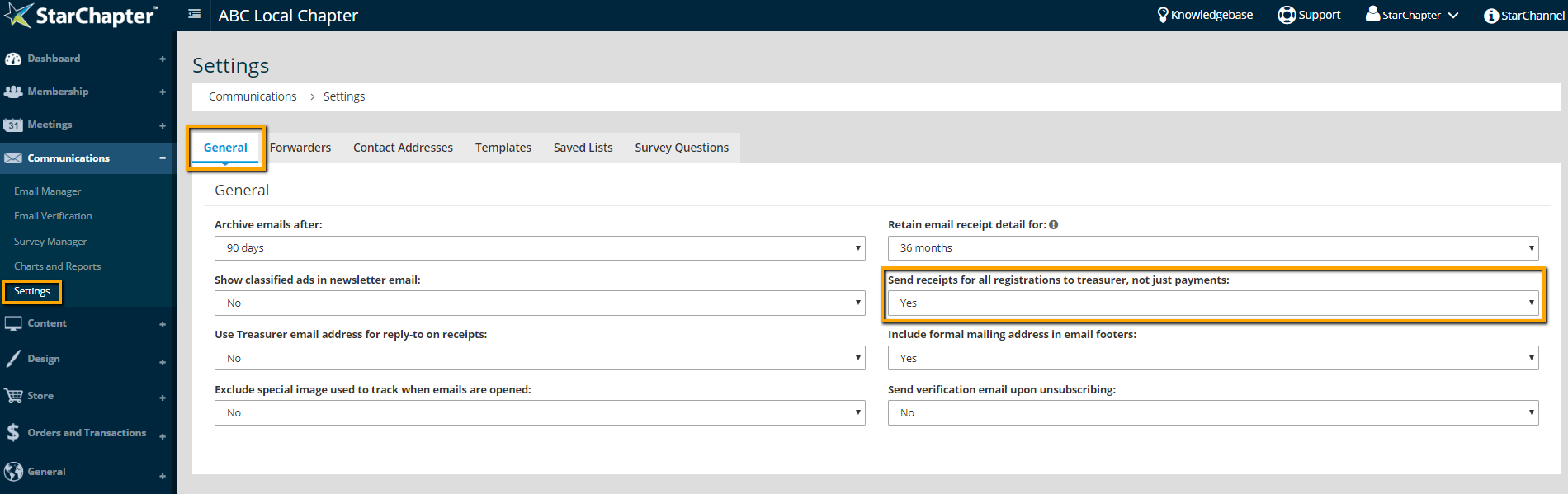
      Enable meeting notification setting

    Chapter Insights

    Posted by [email protected] on 02/14/2018 1:10 pm  /   Communications

    millennial engagement

    Improve Your Millennial Engagement Through Better Understanding

    redefine use of social media

    Is It Time to Redefine Your Chapter's Use of Social Media?

    generational marketing

    Is Generational Marketing Part of Your Plan?

    email fatigue

    Decrease Your Audience's Email Fatigue by Segmenting Your Audiences and Your Emails


    Communications Blog Image - 5 Goals for Using the Chapter Newsletter to Increase Member Value

    5 Goals for Using the Chapter Newsletter to Increase Member Value

    © 2026 StarChapter Software LLC All rights reserved.

    •  
      Board Training
    •  
      Services
    •  
      KB Home
    • Master Service Agreement
    • |
    • Privacy Policy
    . .