You are viewing this design in preview mode. The design MUST be published to be live on your website.
New Board Member?
Support
Video Library
Workflow Library
Page Content Library
Email Builder Content Library
Knowledgebase
Home
> Orders and Transactions
> QuickBooks Configuration
>
Disconnect QuickBooks Online
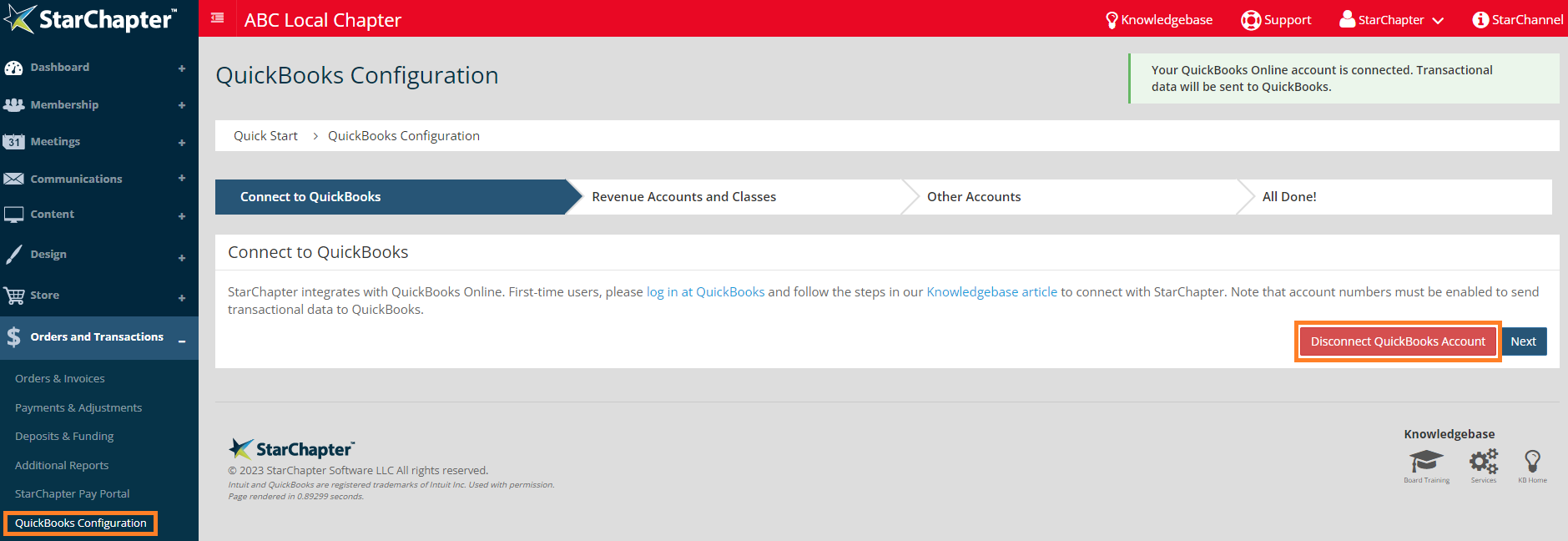
Go to
Orders and Transactions
>
QuickBooks Configuration
.
Click
Disconnect QuickBooks Account
.
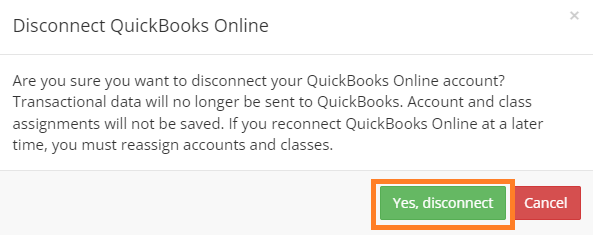
Click
Yes, Disconnect
.
Intuit and QuickBooks are registered trademarks of Intuit Inc. Used with permission.
Chapter Insights
Posted by
[email protected]
on 02/20/2018 2:21 pm /
Orders and Transactions
How to Increase Your Non-Dues Revenue and Build a Strong Revenue Stream
Building a Sustainable Revenue Stream with a Formal Sponsorship Program
A Plan for Your Chapter Finances is Key to Your Long-Term Success
Why You Need to Charge for Meetings and Even More for Your Guests