You are viewing this design in preview mode. The design MUST be published to be live on your website.
    •   New Board Member?
    •   Support
    •   Video Library
    • Workflow Library
    •  Page Content Library
    •  Email Builder Content Library

    Knowledgebase

    • Home
    • > Meetings
    • > Settings
    • > Create a Meeting Category

    Create a Meeting Category

    Meeting categories are used by meeting content sections to identify a sub-set of meetings for display. Typically, these would be specific types of events, such as Monthly Meetings or Golf Tournaments, that you want to highlight specifically. 

    1. Go to Meetings > Settings > Categories and Templates.
    2. Enter the new category name in the New Category field.
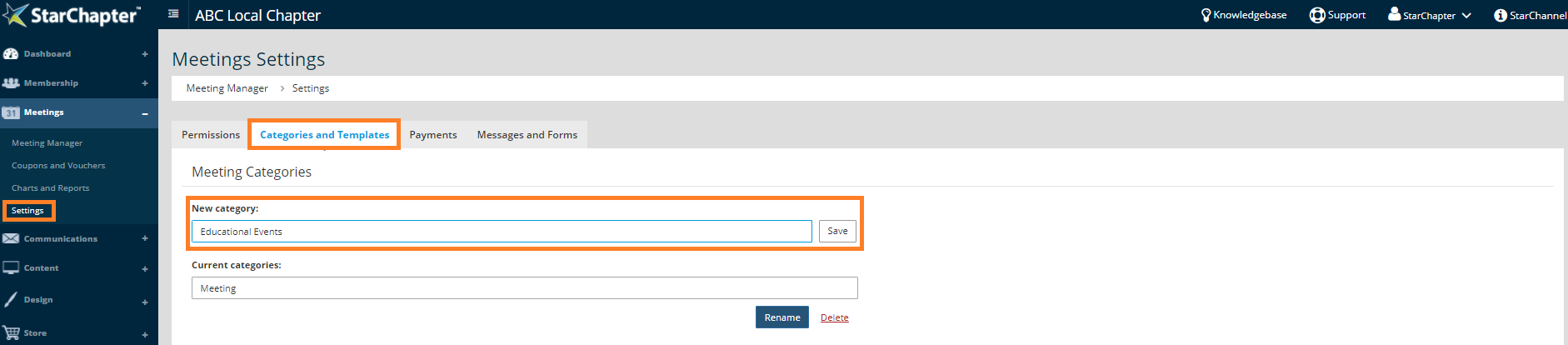
      create a new meeting category

    3. Click Save.
    4. Assign categories within meetings and/or meeting content sections

    Chapter Insights

    Posted by [email protected] on 03/07/2018 9:28 am  /   Meetings

    4 Ways Technology Can Increase Your Virtual Meeting Engagement


    Turn Your Average Remote Events into Engaging Virtual Experiences 


    Hosting a Virtual Golf Event - It Can Be Done


    Give Your Team the Direction They Need to Hold Successful Virtual Events

    © 2026 StarChapter Software LLC All rights reserved.

    •  
      Board Training
    •  
      Services
    •  
      KB Home
    • Master Service Agreement
    • |
    • Privacy Policy
    . .