You are viewing this design in preview mode. The design MUST be published to be live on your website.
    •   New Board Member?
    •   Support
    •   Video Library
    • Workflow Library
    •  Page Content Library
    •  Email Builder Content Library

    Knowledgebase

    • Home
    • > Orders and Transactions
    • > Payments & Adjustments
    • > Confirm Order Payment

    Confirm Order Payment

    Typically, orders are opened and paid within the same user session, but occasionally, a member needs to return at a later date to pay a balance. In either case, the payment is noted in Orders and Transactions > Payments & Adjustments and within the order details of the original order. 

    1. Go to Orders and Transactions > Payments & Adjustments.
    2. Use the search to locate the payment using either the name of the purchase or the Order #.
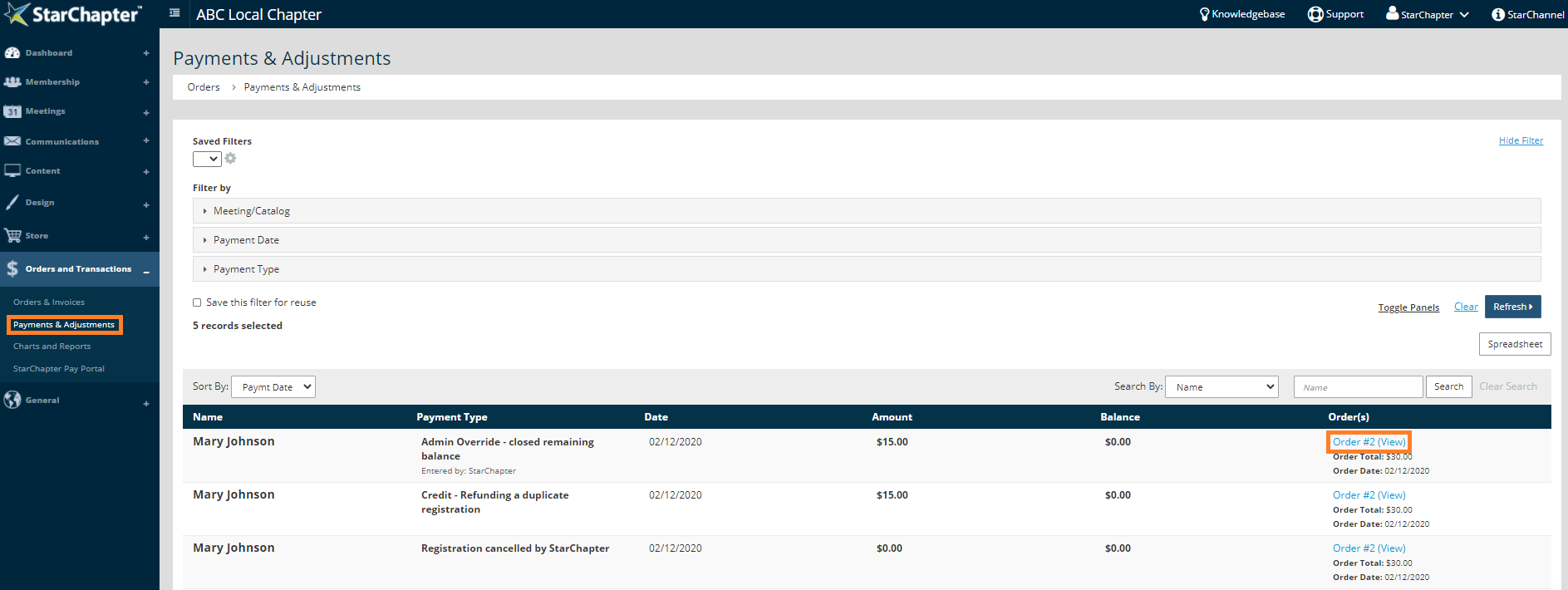
      Access order details

    3. To review all payment details for that order, click the Order # (View) link to the right of the payment record.

    Chapter Insights

    Posted by [email protected] on 02/20/2018 2:21 pm  /   Orders and Transactions

    Increase non-dues revenue

    How to Increase Your Non-Dues Revenue and Build a Strong Revenue Stream


    sponsorship revenue

    Building a Sustainable Revenue Stream with a Formal Sponsorship Program


    chapter finances

    A Plan for Your Chapter Finances is Key to Your Long-Term Success


    charge for meetings

    Why You Need to Charge for Meetings and Even More for Your Guests

    © 2026 StarChapter Software LLC All rights reserved.

    •  
      Board Training
    •  
      Services
    •  
      KB Home
    • Master Service Agreement
    • |
    • Privacy Policy
    . .