You are viewing this design in preview mode. The design MUST be published to be live on your website.
    •   New Board Member?
    •   Support
    •   Video Library
    • Workflow Library
    •  Page Content Library
    •  Email Builder Content Library

    Knowledgebase

    • Home
    • > Membership
    • > Member Manager
    • > Identify New Members

    Identify New Members

    Retention begins as soon as new members join an organization. Receiving a timely greeting, information regarding upcoming events, and access to member benefits ensures that new members value the investment they made in membership. Depending on how membership is managed, there are a few ways to identify new members. 

    This method can be used by any organization that has join data for members. If members apply locally, the join date is the date of their application submission. If member data is imported, the join date must be included in the import map.

    1. Go to Membership > Member Manager > Flexible View.
    2. Use the Dates filter to set the date range of interest in the "Date Joined" fields.
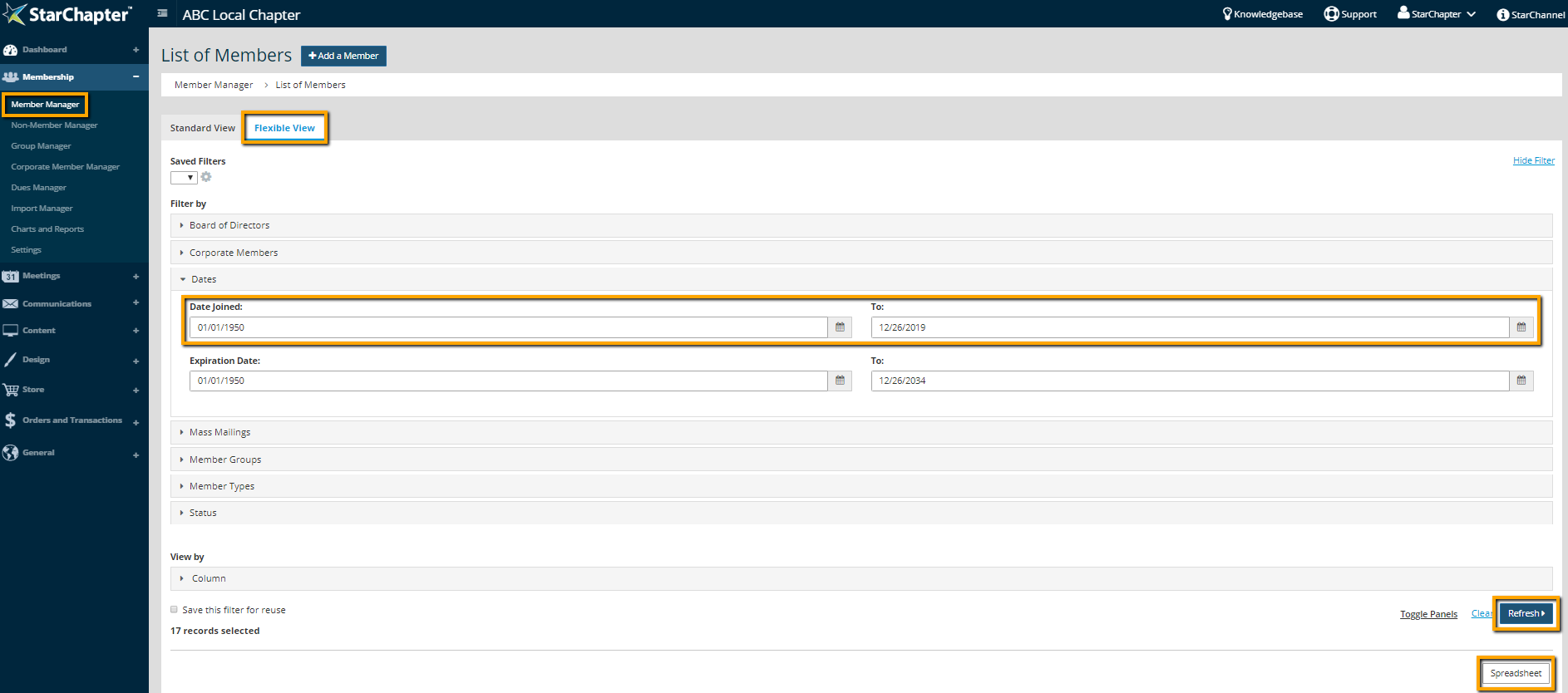
      Date filter in Member Manager Flexible View

    3. Click Refresh.
    4. To export this list, click Spreadsheet.

    Chapter Insights

    Posted by [email protected] on 02/12/2018 4:33 pm  /   Membership

    engaging members

    Are You Engaging with Your Members or Putting Everything on Hold?

    members engaged and active

    Making Chapter Changes that Keep Members Engaged and Active

    retention strategy

    Does Your Board Have a Member Retention Strategy?


    why members join

    Why Do Your Members Join? It's Not for the Reasons You May Think

    improve member retention

    Use Members' Reasons for Leaving to Keep Them from Going

    © 2026 StarChapter Software LLC All rights reserved.

    •  
      Board Training
    •  
      Services
    •  
      KB Home
    • Master Service Agreement
    • |
    • Privacy Policy
    . .