You are viewing this design in preview mode. The design MUST be published to be live on your website.
    •   New Board Member?
    •   Support
    •   Video Library
    • Workflow Library
    •  Page Content Library
    •  Email Builder Content Library

    Knowledgebase

    • Home
    • > Meetings
    • > Settings
    • > Enable Credit Card Bypassing

    Enable Credit Card Bypassing

    If your site is setup with a payment gateway, your event registration, member dues and catalog sales processing will allow payment online. The credit card bypass option allows purchasers to skip the credit card payment form and choose to pay with a check or cash. This is the equivalent of a "Bill Me Later" or "Invoice me" option. The general setting for meetings is under Meetings > Settings > Payments, and is labeled "Allow users to pay by check or cash (credit card bypass)?"

    Meetings-HowTo-Enable Credit Card Bypassing - Allow Users to Pay By Check

    You may also customize the message that appears. Additionally, there are other settings in General > Configuration related to bypassing payments. Search for BYPASS for a full list and descriptions.

    bypass configuration settings

    Bypass Payment Location: Front-End

    The bypass payment button is on the checkout screen during the final payment step.
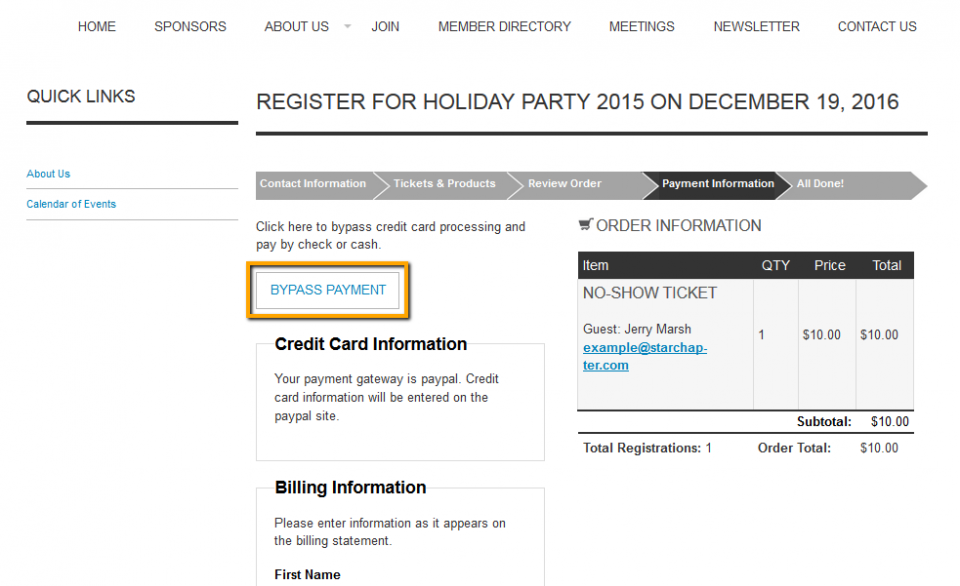
    Meetings-HowTo-Enable Credit Card Bypassing - Front End

    Chapter Insights

    Posted by [email protected] on 03/07/2018 9:28 am  /   Meetings

    4 Ways Technology Can Increase Your Virtual Meeting Engagement


    Turn Your Average Remote Events into Engaging Virtual Experiences 


    Hosting a Virtual Golf Event - It Can Be Done


    Give Your Team the Direction They Need to Hold Successful Virtual Events

    © 2026 StarChapter Software LLC All rights reserved.

    •  
      Board Training
    •  
      Services
    •  
      KB Home
    • Master Service Agreement
    • |
    • Privacy Policy
    . .