Adding a Web Font Family
A web font is a font that is downloaded by the browser at the time of render. It is not pre-installed by an operating system. Google fonts supplies a huge library of fonts for free.
Adding a Google Font Family
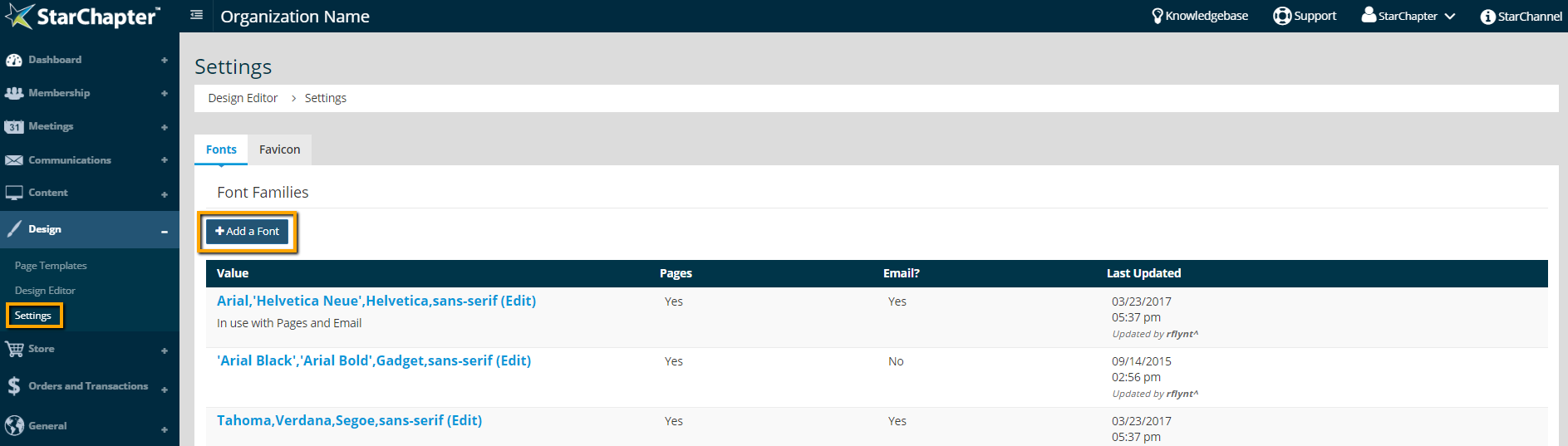
- Go to Design > Settings.
- In the Fonts tab, click the Add a Font button.
- In the pop up, add fonts to the text box.
a. Add the external font. In Google Fonts, after finding a font that works, click the (+) sign to select the font.
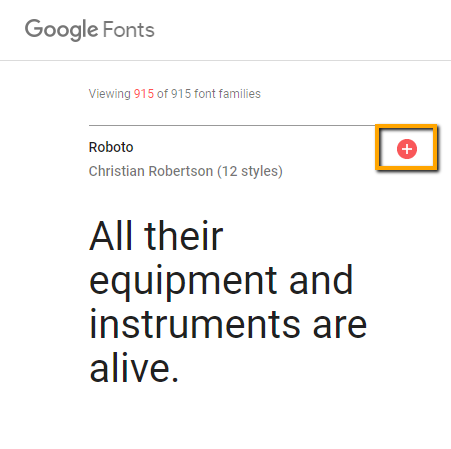
b. Expand the selected font box to see the embed code. Under the “Specify in CSS” section, copy the google font and add it to the text box.
c. Add extra fonts as backups. This is called a font stack. Choosing fonts that are a similar style to the main font will give the best overall result for all viewers. For the font stack, use websafe fonts as the back up fonts. There should only be one Google Font in the font stack.
Tip: Stacking font families is important. This means adding multiple fonts, separated by commas, in the order the font should appear when someone views the website. In case the first font isn’t supported by a viewer’s browser, the next font in the stack will be used, and so on.
d. End the font stack with a generic font classification. A generic font classification is the type of font family that's trying to be achieved like “sans-serif”, “serif”, “cursive”, “monospace”, or “fantasy”. This is the last option for the font stack in the unlikely event that all other specific fonts listed before are unavailable.
Tip: Add as many fonts as desired to the font stack as long as each one is separated by a comma. A good rule of thumb for length of the font stack is 3-6 fonts, including only 1 Google Font.
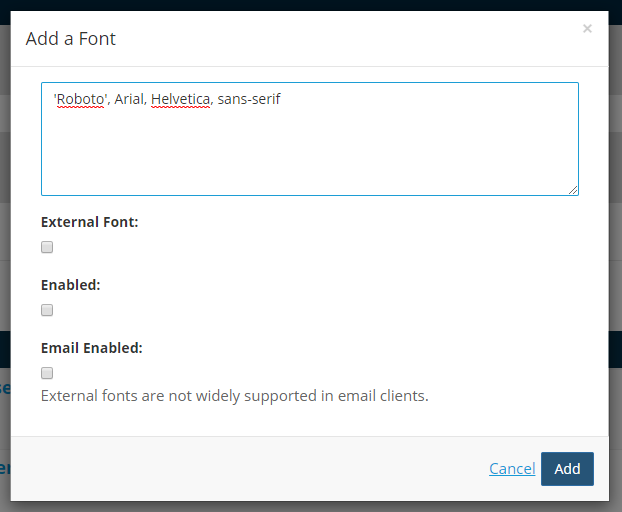
- Check "External Font." A "URL" text box will appear.
- From Google Fonts, under the “Embed Font” section, copy the link and add it in the "URL" text box. The link should start with “https” and end with the google font name.

- Check "Enabled." This will make the font stack available in Design Editor, which can then be selected as the font on the website.
- The "Email Enabled" box cannot be checked. Web fonts, such as Google, are not recommended for email, because email clients don’t always offer support for web fonts. Adding a separate font stack that is web safe, and is similar in look to the web font, is the best way to achieve a similar supported look in email.

- Click Add.
Examples of a sans-serif font stack
'Roboto', Arial, Helvetica, sans-serif
'Lato', Arial, sans-serif
Examples of a serif font stack
Merriweather, ‘Times New Roman’, Times, serif
‘Playfair Display’, Georgia, ‘Times New Roman’, serif
|
Tip: When adding a web font family it is important to copy the family as is, including the single quotes around the family. However, when adding a web safe font family the rules are a little different. A font family with more than one word in its name should be wrapped with single quotes, so it is known that it is one font family. As seen above in the examples Arial isn't wrapped in single quotes, but Times New Roman would be. Roboto, a web font, was copied directly from the source with single quotes. |