Meeting Reports
Common meeting reports are available in Meetings > Charts and Reports > Reports. These reports support both meeting management and post-meeting review.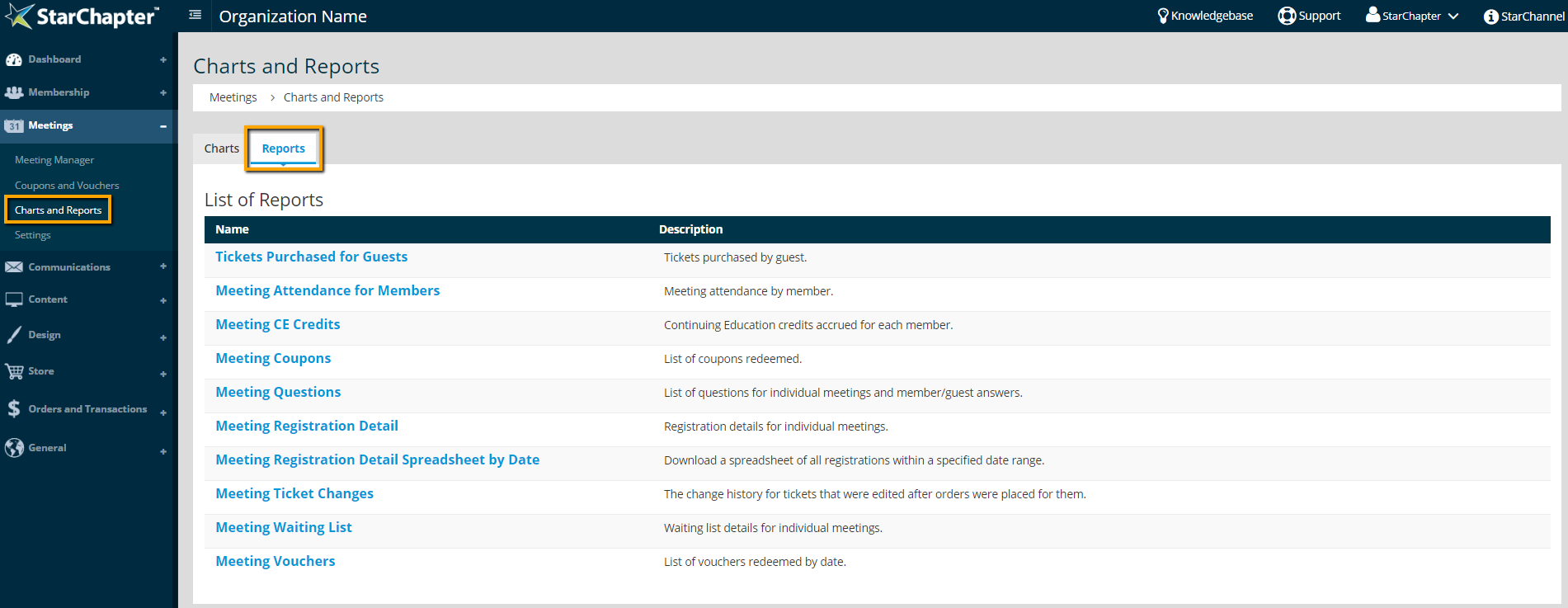
Tickets Purchased for Guests
Guest ticket purchases are tracked by the email address associated with the purchase. This report will identify non-members who have purchased multiple guest tickets. Frequent non-member attendees are good recruitment possibilities.
Meeting Attendance for Members
If member participation is required for continued membership, this report provides an easy way to identify which members have attended that required number of meetings. Filters provide the ability to limit results by date range, number of meetings attended, and specific meeting categories. To see a detailed list of meetings attended by a member, click the Detail button to the left of their name. This report will only track Member Ticket purchases, so a member will not be included on this report if they have purchased Guest Tickets.
Meeting CE Credits
CE Credits can be enabled within each meeting and credits can be assigned to specific member tickets. If a member has registered for a ticket that includes CE credits and is marked attended for that meeting, they will be included in this report. Each member is listed with their credit total. To review which meetings contributed to their total, click their name to review the meeting name and purchase date.
Meeting Coupons
Coupons are created and managed in Meetings > Coupons and Vouchers > Coupons, but if multiple coupons are active, this report will provide a comprehensive list of coupon use sorted by date or event.
Meeting Questions
Questions can be added to either Member or Guest Tickets. To easily review responses, use this report and select the meeting of interest. To export, click the Spreadsheet button. Within that exported spreadsheet, filtering or sorting will provide an easy way to tally responses.
Meeting Registration Detail
This is the most robust meeting report available within StarChapter and is the recommended report if a paper-based check-in process is needed. The Meeting Registration Detail includes names of registrants, order balance, and responses to any ticket questions.
Meeting Registration Detail Spreadsheet by Date
While the Meeting Registration Detail report is meeting specific, the Meeting Registration Detail Spreadsheet by Date provides a quick way to download all registrations over a set date range, regardless of their associated meeting.
Meeting Ticket Changes
This report shows the change history for tickets that were edited after there were orders for them. The originals were marked hidden and the new ones replaced them. Consult this report if you see orders for tickets that do not seem to match the existing ticket definitions. Data shown in red indicates that there has been a change made to this information.
Meeting Waiting List
If a registration maximum is set within a meeting, any registration attempts beyond that maximum will be prompted to join a Wait List. Those potential registrants will be saved to this report. Note that no email notification is sent when potential registrations are added to the Wait List and no registration is automated if a spot becomes available. The meeting coordinator should monitor this report and current registrations. If a ticket becomes available, the meeting coordinator can reach out to wait listed people to prompt registration.
Meeting Vouchers
Vouchers are created and managed in Meetings > Coupons and Vouchers > Vouchers, but if multiple vouchers are active, this report will provide a comprehensive list of voucher use sorted by date or event. Additionally, this report can be used to generate a list of available vouchers.