You are viewing this design in preview mode. The design MUST be published to be live on your website.
    •   New Board Member?
    •   Support
    •   Video Library
    • Workflow Library
    •  Page Content Library
    •  Email Builder Content Library

    Knowledgebase

    • Home
    • > Communications
    • > Settings
    • > Customize Sender Information

    Customize Sender Information

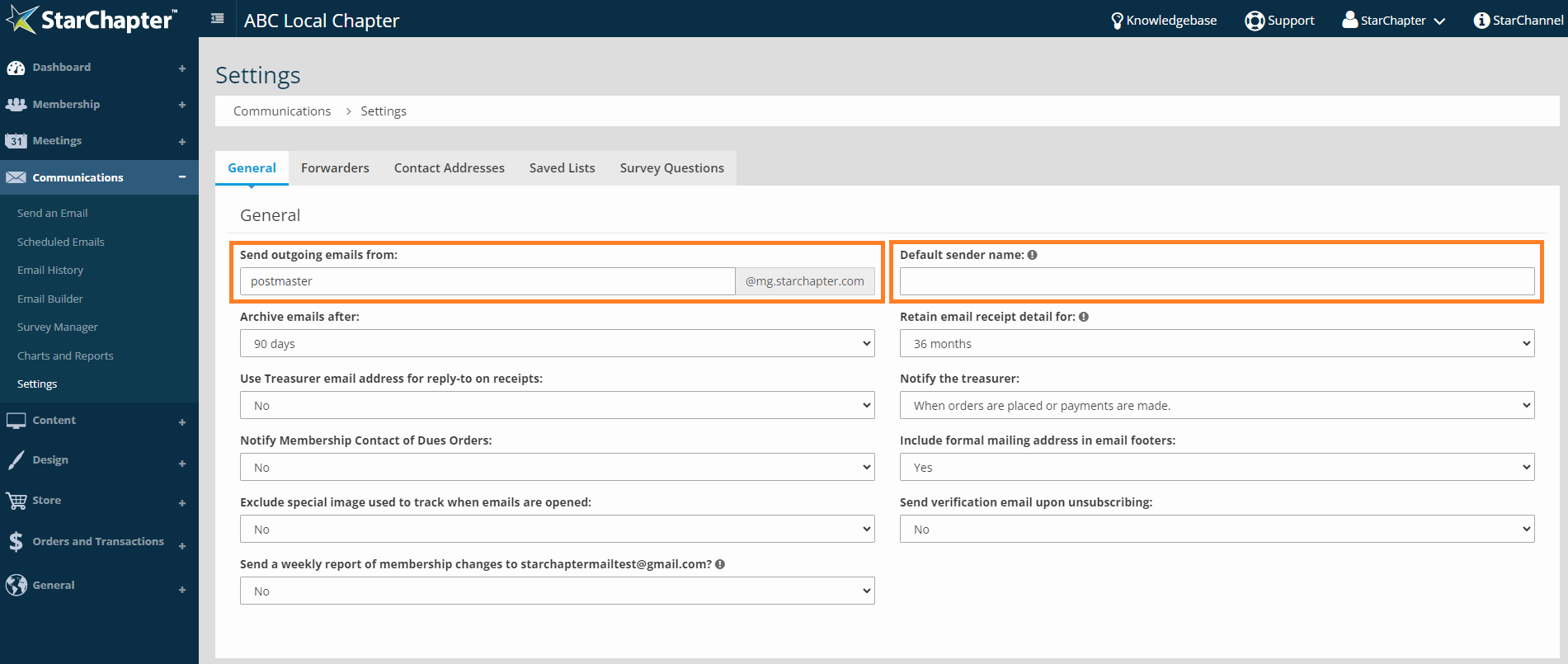
    All mail sent from StarChapter systems will have a "from address" of [email protected], where domain.ext is your organization's domain name. While the @mg.domain.ext is requirement to meet authentication requirements set by major email providers and ensure better email delivery, the "postmaster" portion of the email address and the Sender Name can be customized to better identify your organization's mail to recipients.

    Update From Address

    1. Go to Communications > Settings > General (tab).
    2. Update the "Send outgoing emails from" field to replace the "postmaster" portion of that email address.

    Define Sender Name

    1. Go to Communications > Settings > General (tab).
    2. Update the "Default sender name" field.
    Chapter Insights

    Posted by [email protected] on 02/14/2018 1:10 pm  /   Communications

    millennial engagement

    Improve Your Millennial Engagement Through Better Understanding

    redefine use of social media

    Is It Time to Redefine Your Chapter's Use of Social Media?

    generational marketing

    Is Generational Marketing Part of Your Plan?

    email fatigue

    Decrease Your Audience's Email Fatigue by Segmenting Your Audiences and Your Emails


    Communications Blog Image - 5 Goals for Using the Chapter Newsletter to Increase Member Value

    5 Goals for Using the Chapter Newsletter to Increase Member Value

    © 2026 StarChapter Software LLC All rights reserved.

    •  
      Board Training
    •  
      Services
    •  
      KB Home
    • Master Service Agreement
    • |
    • Privacy Policy
    . .