Automatic Membership Renewals
Automatic Membership Renewals, or Autorenewals, allow members to opt in to annual automatic membership renewal charges to their saved credit card. Automatic renewals reduce the likelihood of members forgetting to renew, which boosts member retention and provides a more predictable revenue stream.
Members can opt in to these automatic charges during the initial member application process or during the membership renewal process. Autorenewals can only be processed when accepting payments via credit card at the time of joining or renewing. Members cannot enroll in Autorenewals when bypassing payment to be invoiced later or when paying by cash or check.
 |
To enable Autorenewals, your Chapter must be on a current Design, current Plan, and must use StarPay. This feature works best for chapters with dues that rarely change, as a dues rate cannot be edited once at least 1 member has opted into an autorenewal at that rate. |
Use the links below to navigate to a specific section for more details:
- Enabling Autorenewals
- Autorenewal Process and Communications Overview
- Autorenewal Settings
- Canceling Autorenewals
- Automatic Renewals Reporting
- Update Dues Rates with Autorenewals Enabled
Enabling AutoRenewals
Autorenewals are turned on within the Dues Manager. Once this feature is enabled, new and renewing members can opt-in for autorenewal during the initial member application process or during the membership renewal process.
 |
Warning: Members are not automatically notified when this feature is enabled. |
- Go to Membership > Dues Manager.
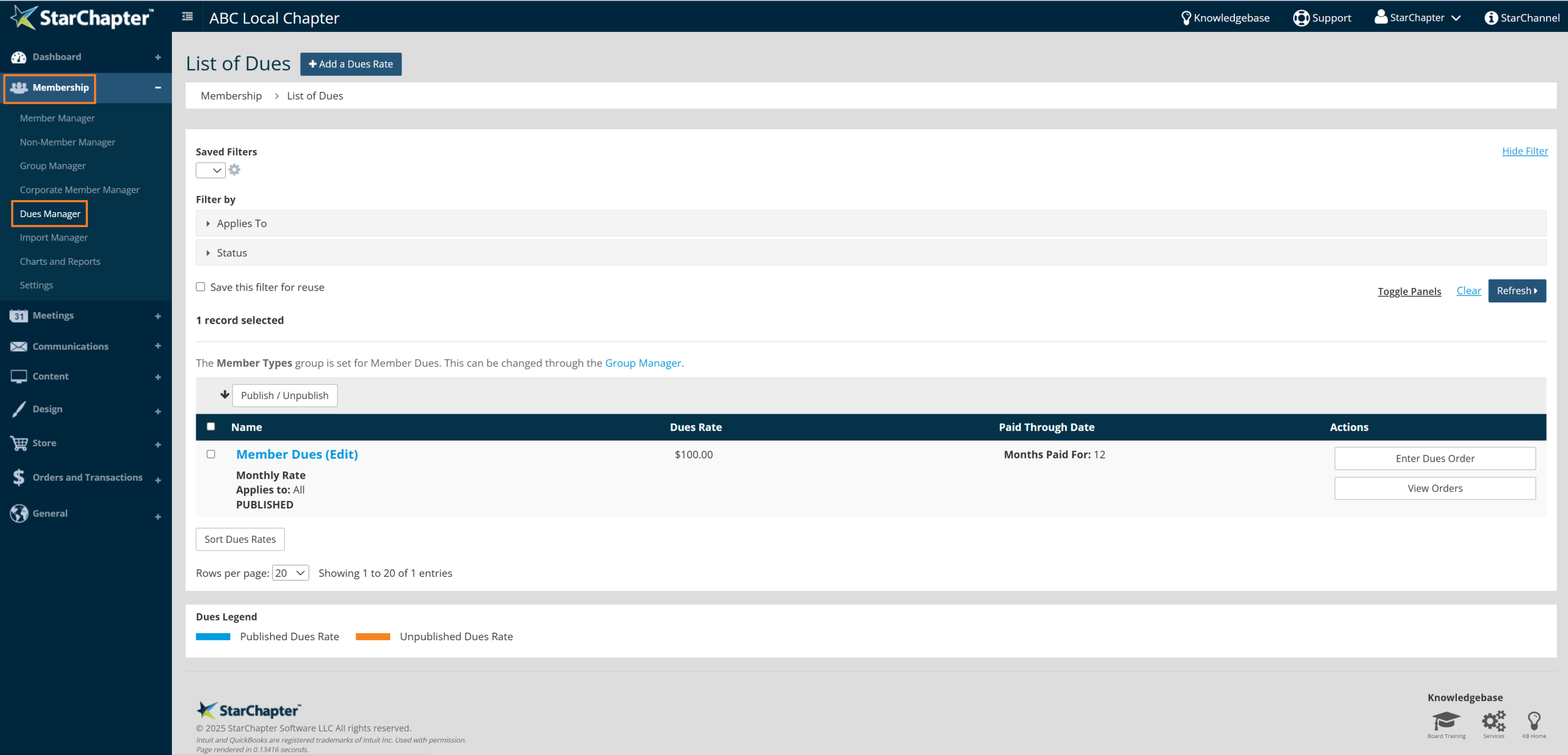
- Locate current dues rate(s).
- Click on the eligible dues rate.
- Check the box to "Allow automatic renewal?"
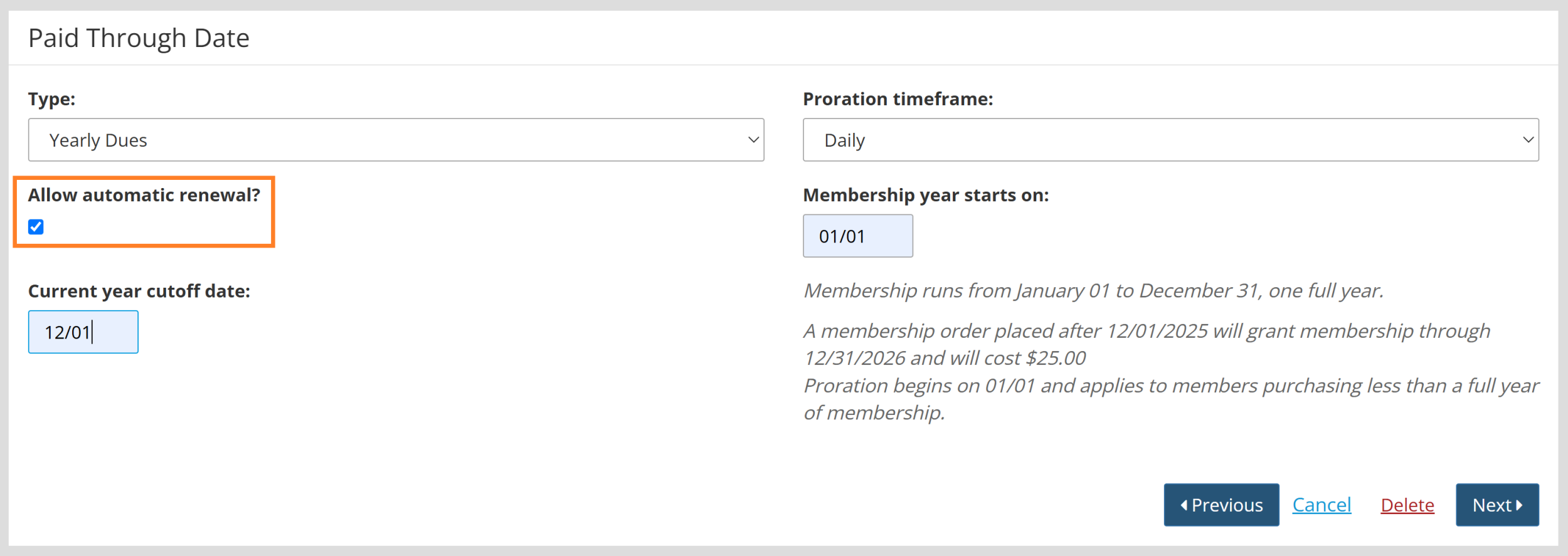
Warning: Automatic renewals can only be enabled for the following dues types: Fixed Monthly Rate, Fixed Monthly Rate with Forced Start Date, and Yearly Dues (pictured above). See Create New Local Dues for more information on creating a dues rate.
autorenewal process and communications overview
When a Member opts in to Automatic Membership Renewals, a series of processes and notification emails are initiated. All email builds can be previewed under Communications > Email Builder.
- When the member opts in to autorenewal, the member receives the Member Renewal Scheduled email build, as well as the standard receipt sent after a dues purchase. The Treasurer Contact email will receive a copy of the invoice, depending on Communication Settings.
- 7 days before the member's autorenewal is scheduled to process, the member receives the Scheduled Renewal Reminder email build. This 7-day lead time is based on chosen settings and can be changed per the Admin's preferences.
- 3 days before the member's expiration date, the member's credit card is processed for payment. The member receives the standard email receipt for dues purchases. The member will also receive the Member Renewal Scheduled email build.
If the member's autorenewal is canceled at any point, the member will receive the Scheduled Member Renewal Canceled email build. See Canceling Member Autorenewals for more details on how an autorenewal can be cancelled.
If the member's autorenewal transaction fails, the member will receive the Scheduled Member Renewal Failed email build.
The Chapter's Membership Contact will receive the Summary of Canceled Renewals email build nightly, when canceled autorenewals have occurred for that day.
AutoRenewal Settings
Automatic Membership Renewals requires very little work on your end to set up; however, there is one setting you may want to adjust based on your preferences.
- Go to Membership > Settings > Dues
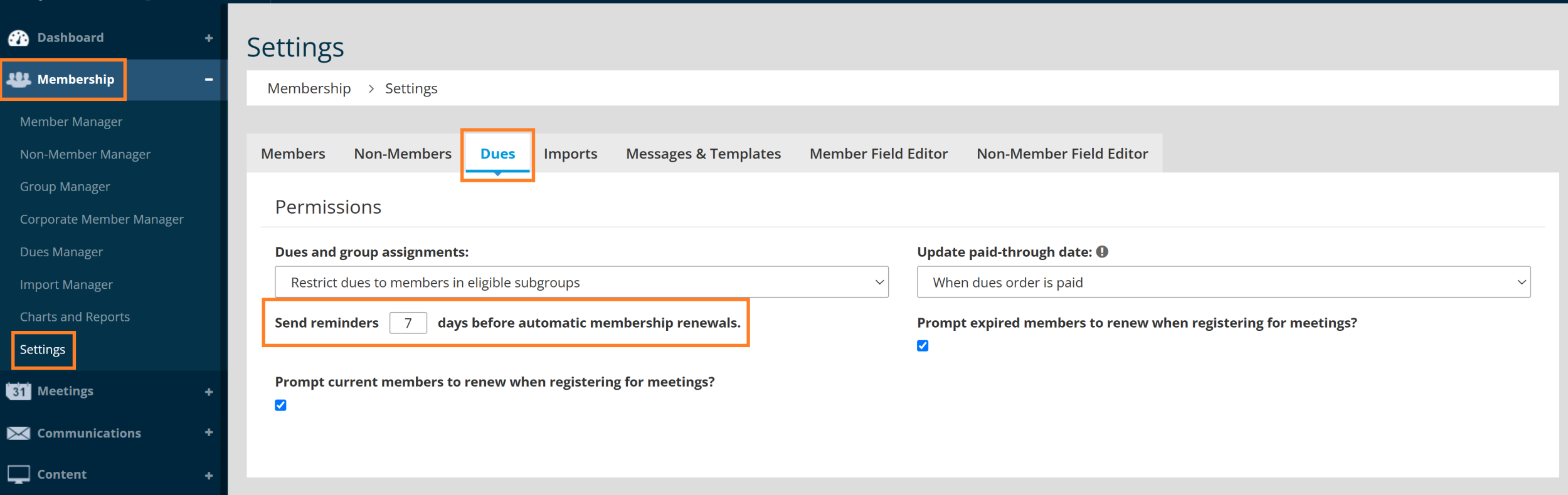
- Adjust the number of days prior to autorenewal that you prefer members be notified their automatic charges are coming. This number can be no less than 7 days.
For more information on other Dues Settings, please go to the Dues Settings Article.
Canceling member autorenewals
The main reason you may need to cancel a Member's auto-renewal is when the dues rate associated with that renewal needs to be increased. In short, you must cancel a member's autorenewal before increasing the dues rate.
Other instances will cause a member's autorenewal to be automatically canceled. These include:
- Member is moved to the Non-Member Manager.
- Member import overwrites the member's paid-through date.
- The dues rate is unpublished.
- Member is moved to a different member type that is not eligible for the same dues rate.
- Member removes saved credit card.
- Member opts out of autorenewal within the member area.
- Member profile enters pending or suspended status.
- Payment failure when autorenewal attempts to run the Member's credit card on file
To manually cancel a member's autorenewal, go to Membership > Charts and Reports > Reports > Scheduled Member Renewals > Click 'Cancel' to the right of the Member's name.
The member will be notified by email and can reactivate autorenewals in their Member Area or renew manually at the end of their membership term.
AutoRenewals Reporting
Reporting on Completed, Active, and Canceled member autorenewals provides oversight of your scheduled membership renewals. Use this report to pull a list of addresses for emails, troubleshooting a member's autorenewal, and canceling scheduled autorenewals as needed.
- Go to Membership > Charts and Reports > Reports > Scheduled Member Renewals.
- Filter for desired results or leave as-is for the full roster of members with autorenewal.
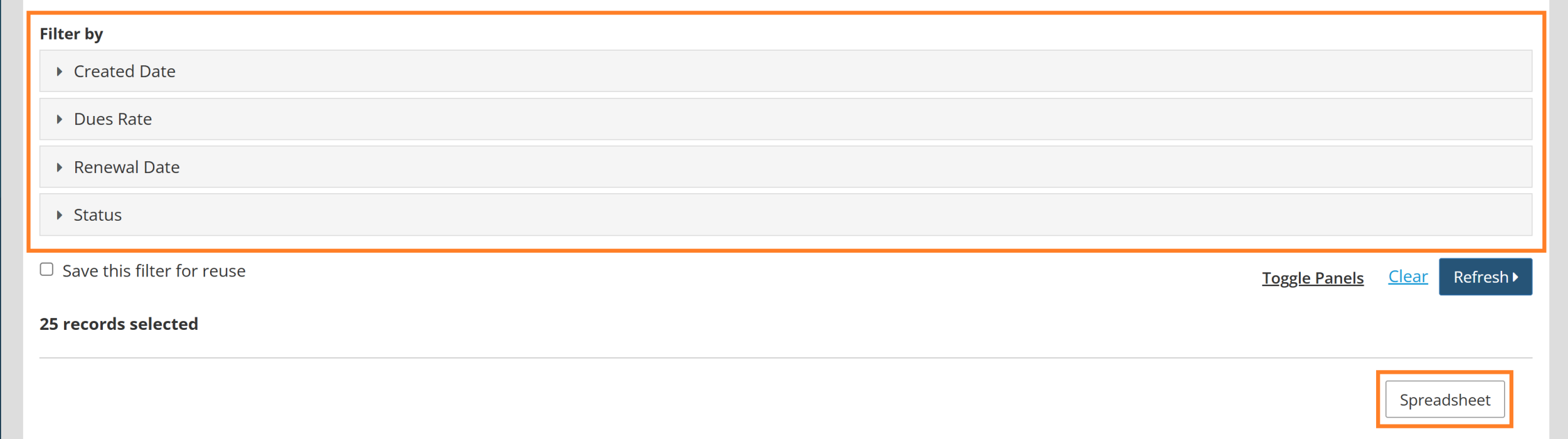
- Click 'Spreadsheet' to download a report.
Autorenewal Report Status Definitions
Completed: Autorenewal has been successfully processed and paid
Active: Autorenewal is active and will process as expected.
Canceled: Autorenewal was canceled. See the Cancelation Reason column for more details.
Autorenewal Report Cancelation Reason Definitions
Autorenewal replaced: Member updated their autorenewal by selecting a different rate. The old autorenewal was never processed. Member renewed manually: Member canceled autorenewal by renewing their membership through manual purchase. A new autorenewal could be initiated in this process.
Member removed from member list: Member was moved from the Member Manager through member import or manual move by Admin.
Admin cancellation: Admin used the Cancel button in the Scheduled Member Renewals Report.
Payment failure: Payment was unable to be processed. Please see Failed Transaction Report under Orders and Transactions > Deposits & Funding. Failure may also occur if there is no stored credit card on the member's account.
Dues rate unavailable: Dues rate unpublished.
Member suspended: Member profile status changed to suspended. This occurs manually by Admin.
Member pending: Member profile status changed to pending. This occurs manually by Admin.
Update dues rates with AutoRenewals enabled
After automatic renewal is initiated on your dues rate(s), and at least one member has opted into an automatic renewal at that rate, the dues rate cannot be edited without cancelling all automatic renewals attached to that dues rate. This protects members from being charged higher rates than they initially agreed to. Please see Canceling Autorenewals for directions on how to cancel a member's active autorenewal.