Automate Member Welcome Emails
Member Welcome Emails are an important part of on-boarding new members. This message is not only a warm welcome to a new member but it includes a link for them to set their account password. This message can be automated regardless of how new members are added to StarChapter. All StarChapter systems process automated welcome emails overnight, so a new member will not go more than 24 hours without a Member Welcome Email being sent.
StarChapter provides a Member Welcome email build. If this will be the version used, follow the steps below. If an alternate email build was created for this purpose, be sure to set that as your Default prior to automating welcome emails.
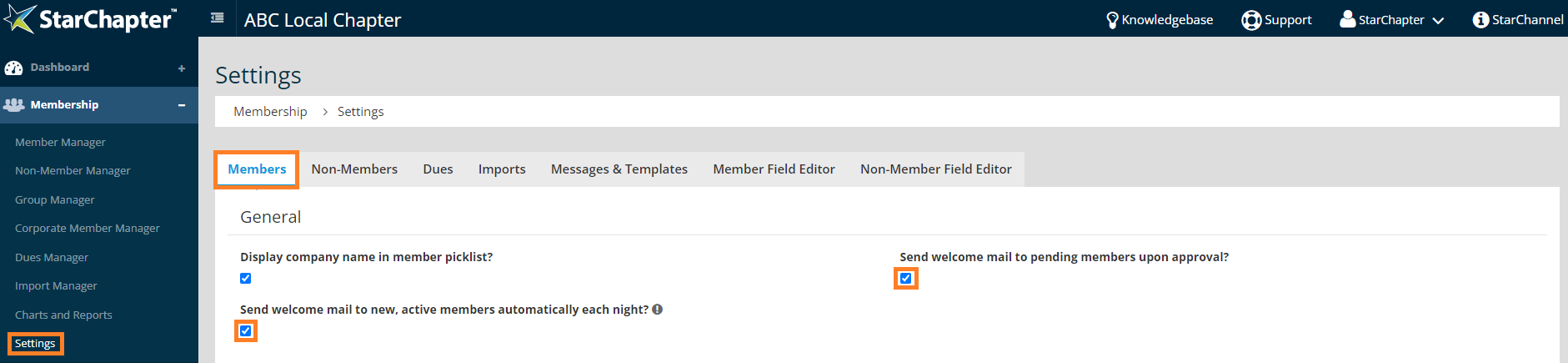
- Go to Membership > Settings > Members > General.
- If members are added through regular imports from a Nationally provided spreadsheet or are automatically approved upon dues payment, enable the "Send welcome mail to new, active members automatically each night?" setting. If members apply locally but are set to a Pending status until approved by an admin, enable the "Send welcome mail to pending members upon approval?" setting.